






When the size of a web project grows, maintaining user interface code and making changes without slowing down the page will become a serious challenge for front-end developers. In traditional methods, changing a small section may reload the entire page, and re-structuring duplicate sections of the site takes a lot of time. In 2013, the Facebook development team released React as an open source library to make it easier to design dynamic and interactive web applications.


Since this library is based on the JavaScript language, taking a course JavaScript training And mastering its basic concepts is the first step to enter this field. After learning these prerequisites, understanding the component-based architecture and how the virtual DOM works will be much more concrete for you. First, we will examine the border between pure JavaScript and React, then we will build the first project by installing standard tools, and finally, we will review the logic of data management in the user interface.
What is the React library and how is it different from pure JavaScript?
The React library is a free and open-source JavaScript-based tool whose main purpose is to design modular user interfaces and build single-page applications. When we talk about pure JavaScript or so-called vanilla JavaScript, we mean coding without the help of libraries and frameworks such as jQuery, React, Angular or Vue. But why do developers go to React instead of pure coding?
The answer lies in the scalability and ease of code maintenance. Remember when Facebook decided to change the simple “Like” button to a series of reactions like hearts and emoticons. This button was repeated in different sections including text posts, videos, images and pages. If this structure were implemented in traditional HTML and pure JavaScript, changing every single one of those likes throughout the application would be a huge burden. React solved this challenge by modularizing the user interface so that code can be written and updated in only one section.
When starting to work with this ecosystem, it is good to pay attention to the difference between its two versions. The React.js version under the MIT license is used to build the user interface of websites, while the React Native framework is used to develop mobile applications. Companies like Instagram, Netflix, Skype, Divar and Snap use these technologies in their projects.
The first step; JavaScript prerequisites to enter the world of React
Jumping straight into React without knowing the basics of the web slows down the learning process. Before installing the tools and starting coding, it is better to make sure that you have mastered the prerequisites of React:
Mastery of basic HTML and CSS; The final output of each component in the browser is a combination of HTML tags and CSS styles. To write pseudo-HTML codes in the React environment and customize the appearance of each section, you need to know the structure of tags and styling rules.
Understanding pure JavaScript; Before jumping into libraries, you should understand vanilla JavaScript logic without dependencies on peripherals. React is built on the same language, and all calculations and program logic are written with standard JavaScript rules.
How to select elements on the page; Familiarity with JavaScript internal methods such as “document.getElementById” is essential. To display its output in the browser, React must find the root element in the HTML file and bind the entire application to it.
ES6 concepts and inheritance in classes; An important part of the coding patterns in this library is based on modern JavaScript standards. Understanding the class concept in ES6 and how inheritance with the `extends’ keyword is directly applicable to building class components.
Familiarity with the logic of callback functions; In the React architecture, the data flow is one-way, and developers cannot edit components directly. Callback functions are used to apply changes and maintain control over different parts of the program.
The second step; Understanding the basic concepts in React architecture
Before we start installing the tools, we need to get familiar with React’s working logic. Relying on a different architecture and declarative approach, this library simplifies user interface construction and maintenance. Knowing the components and functionality of the virtual DOM along with the JSX structure will help you understand what’s going on behind the scenes of the browser when writing code.
Component-based structure
The main focus of React architecture is on a concept called “component”. Each component in React is an independent part of the web page that encapsulates its own logic and behaviors. This approach in Creating a user interface with React It makes the codes reusable and eliminates the need to write a repetitive part several times.
In this structure, a web page is broken into smaller components and subcomponents. For example, the like button can be an independent subcomponent that is often placed in different sections such as image or text posts. When these small pieces are combined together, complex user interfaces are formed that can be updated only by changing the code in one place.
Virtual DOM performance and increased speed
Normally, when a change is made to a part of the website, the entire page will be reloaded. This imposes expensive operations on the browser and prevents fast and scalable changes. To solve this problem and improve efficiency, the React library has gone to the virtual document object-oriented model, or Virtual DOM.

Instead of directly manipulating the browser’s DOM, React creates a virtual version of it in memory. Whenever there is a change to the user interface, this virtual DOM is updated first, and then only the parts of the page that actually need to change are applied to the browser’s main DOM. This mechanism prevents the refresh of the entire page and increases the rendering speed of web pages.
Writing hybrid code with JSX
In the React architecture, you come across a term called JSX or JavaScript XML, which is a syntax extension for JavaScript. This feature allows writing pseudo-HTML codes directly into JavaScript files to simplify the user interface design process. Using this structure in React is not mandatory, but in practice, a large part of projects are developed with this pattern.
Browsers are not natively able to understand and implement this hybrid structure. For this reason, in React projects, a tool like Babel is used to translate the code written with JSX into standard JavaScript so that the browser can read them.
the third step; Preparing the environment and creating the React project
After familiarizing with the working logic and basic components, it is time to launch the development environment on the system. To create a React project and start real coding, there is a need to install some specific tools for package management and code editing, which will be reviewed in the next two steps.
Install Node.js, NPM package manager and VS Code editor
To generate single-page web applications with React, you must first download and install Node.js from its official site. This program has the role of server and platform necessary to install and run related packages. Along with the installation of Node.js, the NPM package management tool is automatically installed on the system so that you can add front-end packages to the project without having to manually download them.
To ensure correct installation, open the Command Prompt environment or CMD and write the following command:
bash
node –version
Showing a number means successful installation. If the installed version is older than version 11, first remove it and install the new version. In the last step, install VS Code code editor. During installation, in the Select Additional Tasks section, tick the Open with Code option to enable direct opening of project folders through right-click.
Creating the first application with Create React App and NPX tools
React codes use patterns that the browser cannot execute by default and require a tool like Webpack for packaging. In order not to get involved in complex Webpack configurations and basic details at the beginning, the Create React App package creates a ready and standard template for you.
First, create a folder in one of your system drives and open the CMD environment in the same path. The standard way to create a project is to use the NPX tool, or Node Package eXecute. With this method, you will always get and run the latest version of Create React App without having to install the package permanently on the system. Just enter the following command in the command line:
bash
npx create-react-app first-app
In this command, `first-app’ is the name of the folder and project. You are not allowed to use capital letters when choosing the name of the project; All letters should be lowercase and use hyphens to separate words. After running the command, depending on the internet speed and system hardware, it may take a few minutes to build the project files.
the fourth step; Checking the code structure and rendering of components
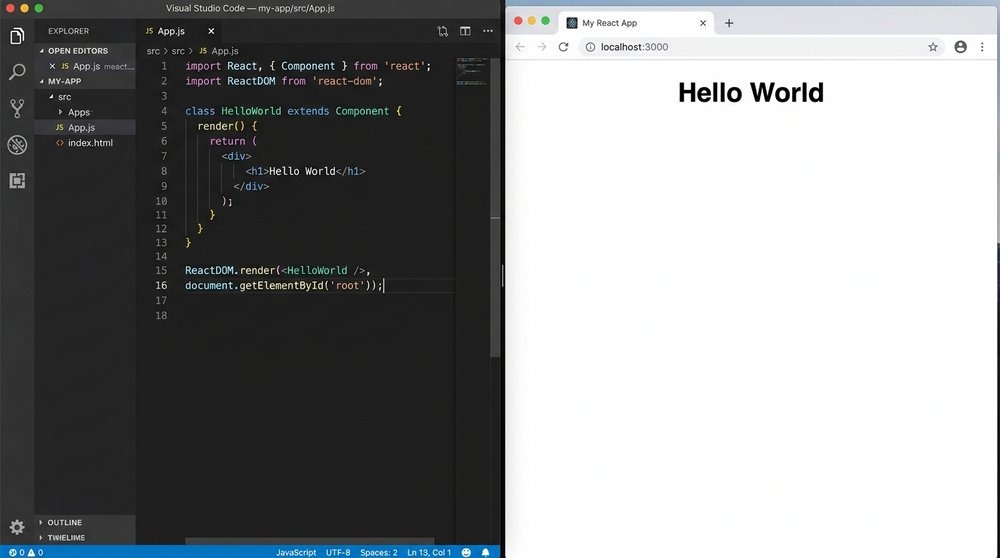
After building the project, open its root folder in the VS Code environment so that the basic codes are available. In the HTML file structure of a React application, there is usually a `div’ tag with the “root” identifier, which acts as the main root of the application. To understand how to create a component and inject it into this HTML element, let’s examine the code snippet for displaying the phrase “Hello World”:
jsx
class HelloWorld extends React.Component {
render() {
return
}
}
ReactDOM.render(
In the first line, the “HelloWorld” class is defined based on ES6 standards, which inherits its properties from “React.Component”. Inside this class, there is a special `render()` method; React always looks for this method to figure out what content to display in the output. In this example, the mentioned method is a `
The final line of code is responsible for connecting the JavaScript logic to the web page. The “ReactDOM.render” method of the built-in component means `
the fifth step; Data management in React and connection logic to the server
The dynamics of the user interface in React is based on one-way data flow. In this architecture, data moves from parent components to child components so that program behavior remains predictable and debugging is easier. The management of this information in different parts of the page is done by relying on the two concepts of state and props. When the project becomes large and complex, tools like Redux come to the aid of the developer to manage the different states of the application in a unified way.
However, React is only a front-end library for building user interfaces and does not generate or store data on its own. In order for the web page to get out of static or hardcoded mode and display real information, the frontend must communicate with a server or backend system. Therefore, developers who want to understand the full cycle of data movement usually turn to resources such as Back-end learning at home They go to know the logic of the server side. In a real web application, data is received from the server side, placed in the form of State or Props, and then React renders them into components.
summary
The path to enter React programming starts with strengthening the basics of JavaScript and takes a practical form by understanding the structure of components and the function of the virtual DOM along with writing JSX codes. Launching the project with the NPX command in the VS Code environment also provides the necessary infrastructure without messing with the initial setup, so that the main focus remains on rendering page components and managing the one-way flow of data until the server connection stage.
Mastering the concepts of react js training is not achieved by just reading the theories and requires continuous coding. From this point, create your first practice project on the system and measure your learning in practice by changing the component codes.













گفتگو در مورد این post